# git merge
では実際にmergeしてみましょう。
現在`feature1`にcommitが1つ積まれている状態で、`main`の方は`feture1`を切った時点からcommitを積まれていません。`feature1`を`main`にmergeしましょう。`main`にいることを確認して、以下のコマンドを叩きましょう。`--no-ff`をオプションとして指定しない場合、`feature1`のみにcommitが積まれていると`Fast-forward`でのmergeになるのため、3way mergeをする場合は指定します。
```bash
git merge --no-ff feature1
```
上記を叩くと、エディタが開き以下のように表示されるかと思います。
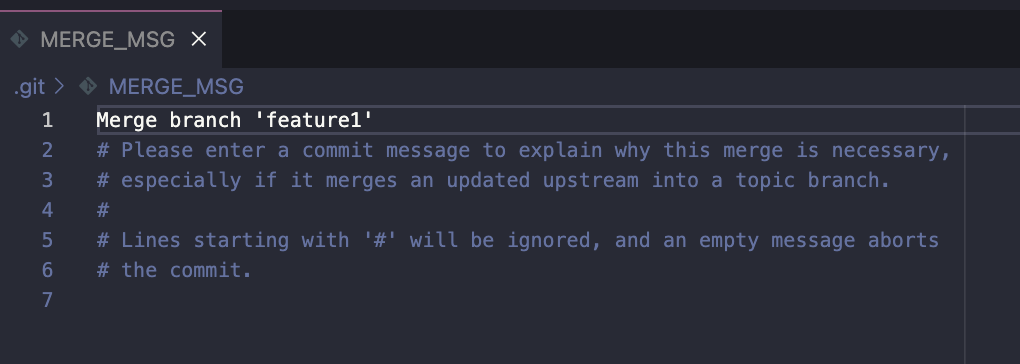 commit messageがデフォルトで`` Merge branch 'feature1` ``と入力されているかと思います。こちらのファイルを閉じましょう。
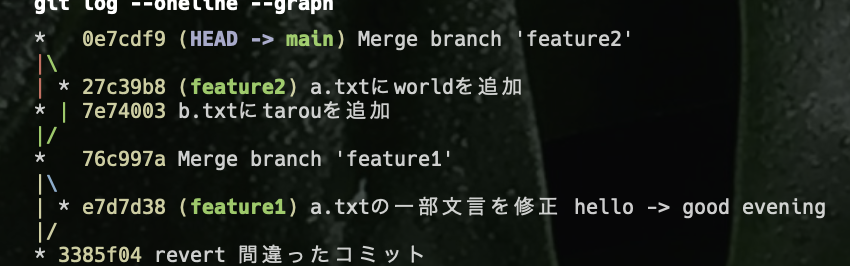
git logにてcommitを確認しましょう。--graphオプションをつけると、以下のようにmergeした際の図式を視覚的にみやすく表示することができます。
```bash
git log --oneline --graph
```
commit messageがデフォルトで`` Merge branch 'feature1` ``と入力されているかと思います。こちらのファイルを閉じましょう。
git logにてcommitを確認しましょう。--graphオプションをつけると、以下のようにmergeした際の図式を視覚的にみやすく表示することができます。
```bash
git log --oneline --graph
```
 次にmainとfeatureでそれぞれcommitを積んで、mergeしてみましょう。
以下コマンドを叩き、`feature2`にて作業します。
```bash
git switch -c feature2
```
`a.txt`を以下のように編集しましょう。
次にmainとfeatureでそれぞれcommitを積んで、mergeしてみましょう。
以下コマンドを叩き、`feature2`にて作業します。
```bash
git switch -c feature2
```
`a.txt`を以下のように編集しましょう。
sample1
tarou
good evening
world
その後、`git add`、`git commit`をしましょう。
```bash
git add .
```
```bash
git commit
```
commit messageは以下とします。
```
a.txtにworldを追加
```
`main`に切り替えましょう。
```bash
git switch main
```
`b.txt`を以下のように編集します。
sample2
tarou
その後、`git add`、`git commit`をしましょう。
```bash
git add .
```
```bash
git commit
```
commit messageは以下とします。
```
b.txtにtarouを追加
```
ではmergeしてみましょう。
```bash
git merge --no-ff feature2
```
commit messageはデフォルトのままとします。
再度git logにて確認してみましょう。
```bash
git log --oneline --graph
```
以下のように表示されるかと思います。