# git rebase
では実際に`rebase`をしてみましょう。feature4にて作業します。
```bash
git switch -c feature4
```
a.txtを以下のように修正しましょう。
sample1
tarou
good evening
world
I come from Japan.
その後、`git add`、`git commit`をしましょう。
```bash
git add .
```
```bash
git commit
```
commit messageは以下とします。
```
a.txtに出身の文章を追加
```
`main`に切り替えましょう。
```bash
git switch main
```
`b.txt`を以下のように編集します。
sample2
tarou
good evening
hello
I come from Japan.
その後、`git add`、`git commit`をしましょう。
```bash
git add .
```
```bash
git commit
```
commit messageは以下とします。
```
b.txtに出身の文章を追加
```
では、`feature1`に`main`をrebaseします。
`feature1`に移動しましょう。
```bash
git switch feature1
```
rebaseする前にgit logにて確認すると、以下のように表示されるかと思います。当然`main`での変更を含まれていません。
```bash
git log --oneline --graph
```
 では以下のコマンドを叩きましょう。
```bash
git rebase main
```
再度git logにて確認すると、`feature1`でのcommitの前にmainでのcommitが追加されたかと思います。
```bash
git log --oneline --graph
```
では以下のコマンドを叩きましょう。
```bash
git rebase main
```
再度git logにて確認すると、`feature1`でのcommitの前にmainでのcommitが追加されたかと思います。
```bash
git log --oneline --graph
```
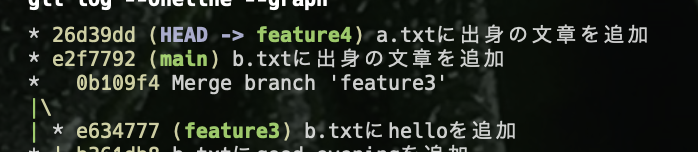 rebaseに関しても、もし同じファイルの同じ行を編集していた場合は、conflictが起こり、conflictを解消する必要がありますが、この章ではその方法は説明しません。